
The Dental R.A.T. needs no additional software, so training is about motor skills and workflow rather than a new program.
You plug it into a USB port and use it with the periodontal charting software your office already runs. Watching the device work inside the software you use every day is the fastest way to build confidence, and that is the purpose of this video library.
Start With the Dental RAT Introduction Video
The introduction video is a must-see for anyone considering the Dental R.A.T. In about five minutes, Becky Logue, the founder and inventor of the Dental R.A.T., walks through the basics. The video covers three areas:
- 01History: why the device was created and the problem it addresses in the operatory.
- 02Basic functionality: how the foot controls replace a hand mouse and how numbers are entered.
- 03Benefits: what hands free charting means for workflow, staffing and patient experience.
The introduction video includes training with Dentrix and Eaglesoft. The Dental R.A.T. has also been tested and works with other major dental software packages, including PracticeWorks, Softdent and PerioExec. It even works with the Florida Probe software.
Software Specific Dental RAT Training Videos
Periodontal charting screens differ from one program to the next, in layout, in where the cursor must rest and in how numbers are accepted. For that reason Dental RAT produced a series of videos specific to the most commonly requested periodontal software brands. They show the Dental R.A.T. working with your favorite charting software. The current library includes:
The "Setting up Dental R.A.T." and "Loading Audio Feedback" videos are not tied to one charting program. They cover the hardware connection and the spoken readback feature, which apply to every office.
- Eaglesoft video
- Dentrix G4
- Easy Dental/Dentrix
- Soft Dent video
- Setting up Dental R.A.T.
- Loading Audio Feedback
- Complete Exam
What If Your Software Is Not Listed?
Not having a dedicated video is not a limitation of the device. The Dental R.A.T. runs all practice management software, and videos simply have not been made for every program. Beyond the titles above, the Dental R.A.T. also runs software such as Daisy Dental, MacPractice, Alta, Genesis, Dentech, Maxim, Panda Perio and XL Dent. If a video for your favorite software would help, you can make a request.
The reason is technical. The computer sees the Dental R.A.T. as another mouse. Any function you can perform with a hand mouse in a given program can be performed with the foot mouse.
The Controls You Will See in the Videos
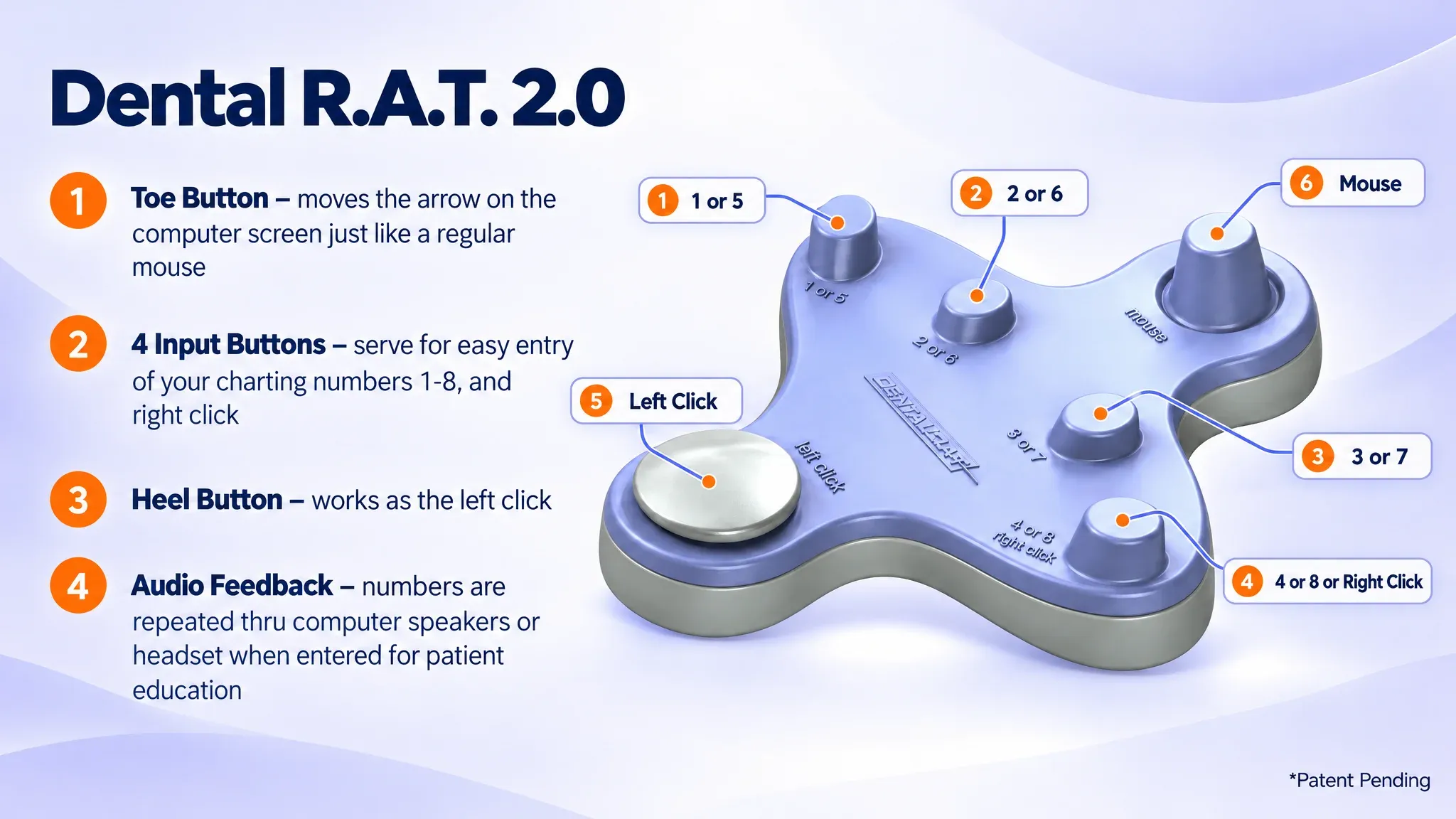
Knowing the layout before you watch helps the demonstrations make sense. The Dental R.A.T. has these controls:
- Toe button: moves the arrow on the computer screen just like a regular mouse.
- Four input buttons: used for entering charting numbers 1 through 8, and for right click.
- Heel button: works as the left click.
- Audio feedback: numbers are repeated through computer speakers or a headset as they are entered, which supports patient education.
Because the heel button is the left click, tasks such as selecting an on-screen field, entering bleeding or recession in software that supports it, or capturing an intraoral camera image become a heel tap while the cursor rests in position. The videos show these actions in the context of real charting screens.
Getting the Most From the Videos
Dental RAT suggests spending about 30 minutes simply playing with the buttons and the mouse. Many users find the hardest part is the cursor control, but the learning curve is still short, and speed improves with each use. A practical approach:
- Watch the introduction video for the overall concept.
- Watch "Setting up Dental R.A.T." and connect the device by USB.
- Watch "Loading Audio Feedback" if you want numbers repeated aloud.
- Watch the video for your charting software, then practice on a test patient record.
- Adjust the mouse speed to suit you. The Dental R.A.T. has 1,000 speed settings, adjusted by holding buttons #1 and #2 together while moving the joystick.
- Call for individualized tips once you are comfortable with the basics.
Training for Teams and Schools
The videos support onboarding for entire hygiene teams as well as individual clinicians. Consistent training means every hygienist and doctor uses the device the same way, which protects the workflow gains of hands free charting. Dental RAT provides free support and training videos alongside the product, so offices and teaching clinics can bring new users up to speed without a lengthy installation or software rollout.
Need Help or a Demonstration?
If you would rather talk through setup, call 877-278-0061 or email bky.logue@gmail.com. Phone support is available Monday through Friday from 9am to 5pm. The office is closed Saturday and Sunday. You can also contact Dental RAT to request a free demo of the foot mouse or a video for your software.
Frequently Asked Questions
Which software specific Dental RAT training videos are available?
The library includes videos for Eaglesoft, Dentrix G4 and Easy Dental/Dentrix, plus a Soft Dent video. It also includes "Setting up Dental R.A.T.", "Loading Audio Feedback" and "Complete Exam". These cover the most commonly requested periodontal software brands.
What does the introduction video cover, and who presents it?
Becky Logue, the founder and inventor of the Dental R.A.T., presents the introduction video. It runs about five minutes and covers the history of the device, its basic functionality and its benefits. It includes training with Dentrix and Eaglesoft.
Is there a video that shows how to load the audio feedback?
Yes. The "Loading Audio Feedback" video demonstrates the process. Written instructions for both Windows and Mac are also on the Downloads page. If you run into trouble, call 877-278-0061.
Where can instructors and team trainers find training resources?
This page is the main resource, with the introduction video and software-specific videos. The Downloads page adds a user manual and the audio feedback installers. For group onboarding support, call 877-278-0061 or email bky.logue@gmail.com.
Which video should I watch first to connect the device?
Start with "Setting up Dental R.A.T." It applies to every office regardless of charting program. The device connects through a USB port and needs no additional software, so setup is mostly a matter of plugging in and confirming the cursor responds.
Why are there software specific videos if the Dental R.A.T. works like a regular mouse?
Because the computer sees the device as another mouse, it works anywhere a hand mouse works. However, each charting program has its own screen layout, its own on-screen number entry and its own rules for where the cursor must rest. The software-specific videos show those details so you can chart efficiently in your own program from the first appointment.
Which software works with the Dental R.A.T. beyond the programs in the introduction video?
The introduction video demonstrates Dentrix and Eaglesoft. The Dental R.A.T. has also been tested and works with PracticeWorks, Softdent and PerioExec, and it works with the Florida Probe software. Dental RAT states that it runs all practice management software.
How can a practice use the videos to onboard a new hygienist?
Have the new team member watch the introduction video, then the setup video and the video for your charting software. Follow that with the roughly 30 minutes of hands-on practice Dental RAT recommends. Using the same sequence for every new user keeps technique consistent across the office.
How should I practice after watching the videos?
Spend about 30 minutes learning the buttons and the cursor control away from live patients, for example on a test record in your charting software. Cursor movement is usually the hardest skill, and speed improves every time you use it. Adjust the mouse speed during practice to find a setting that suits you.
Can I get individualized tips beyond what the videos show?
Yes. The videos give basic instructions, and Dental RAT invites you to call 877-278-0061 for tips and tricks that can make your periodontal charting even faster. Phone hours are Monday through Friday, 9am to 5pm.