
The Four Ways Offices Chart Perio Today
Most offices use one of four approaches:
- An assistant records the numbers.The clinician calls out readings and a second person enters them.
- Voice recognition.The clinician speaks the readings into a microphone and software converts them into entries.
- An automated periodontal probe.The probe captures depths electronically and sends them to the chart.
- A hands-free foot mouse.The clinician enters numbers and navigates the software with the feet while the hands stay on the patient.
Each approach trades off staffing, cost, accuracy, integration effort and infection control differently. The Dental R.A.T. site publishes this comparison so offices can weigh those trade-offs before deciding.
Why Offices Look for a Voice Activated Perio Charting Alternative
Voice recognition is attractive in principle because it appears to remove both the assistant and the keyboard. In practice the operatory is a difficult acoustic environment. Suction, handpieces and ultrasonic scalers produce continuous noise. A mask muffles speech. Spoken digits such as "five" and "nine," or "two" and "to," are easy for a recognition engine to confuse. Any misrecognized reading becomes a wrong value in a legal record, so the clinician has to keep checking the screen, which defeats the purpose.
Dental professionals who have tried it describe the same pattern. Michelle Heil, BS, RDH, a hygienist with 18 years of experience, was eager to try voice activated charting but became frustrated by the lack of reliable technology, which led to many errors. Dr. Keith Asarkof reported that his voice system was "extremely finicky" and eventually failed altogether, and his tech support team could not revive it. He also looked at an automated periodontal probe and found it too complex for his needs and extremely expensive. These are individual experiences, but they match what the technology's constraints would predict.
How a Foot Mouse Removes the Recognition Step
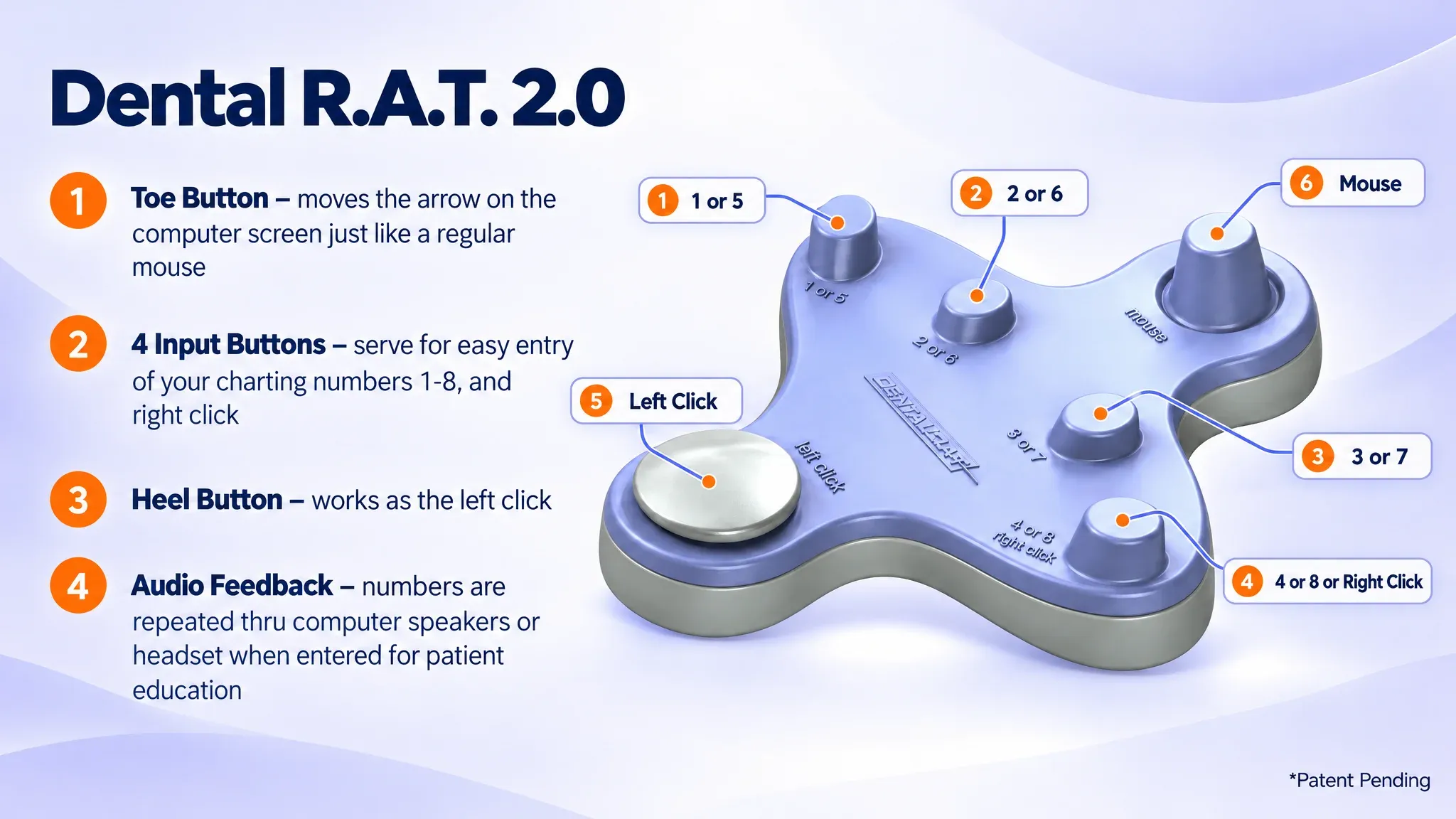
The Dental R.A.T. is a foot-operated mouse that gives hands-free access to periodontal charting, intraoral cameras and digital X-rays. It sends discrete, deterministic input: a button press produces one number. There is no acoustic interpretation, so room noise, masks and accents do not affect it. Its controls map directly onto standard mouse behavior:
The spoken readback replaces the one real strength of voice systems, confirmation without looking at the screen. The difference is that the voice is output rather than input. The clinician's entry is exact, and the computer confirms it aloud, which also helps with patient education.
- Toe button:moves the on-screen arrow, like a regular mouse.
- Four input buttons:enter charting numbers 1 through 8, and right click.
- Heel button:works as the left click.
- Audio feedback:the entered numbers are repeated through computer speakers or a headset.
Integration: No New Software Layer
Because the computer sees the Dental R.A.T. as another mouse, it plugs into a USB port and works without additional charting software. It runs with the periodontal charting program the office already uses, including Dentrix, Eaglesoft, PracticeWorks, Softdent, PerioExec, Open Dental, MacPractice and the Florida Probe software. The only optional download is the audio feedback program for Mac or Windows.
An office does not have to migrate charts or adopt a new charting platform to try a different input method. The Dental R.A.T. 2.0 can be wireless over radio frequency or wired by USB.
Staffing and Cost: The Comparison That Matters Most
Dr. Gordon Christensen reviewed dental software programs in the February 2003 edition of CRA. His independent research found that the top concern across the top eight software packages was that they did not reduce staff costs, and one of the most desired features was "hands-free periodontal charting." The software had added capability without removing the need for a second person.
The foot mouse addresses that gap directly. It lets one person do a job that used to take two staff members, so the assistant is no longer tied to the hygiene room for charting. Heil noted a welcome drop in stress in her office because assistants were no longer pulled in many directions. Charting time itself is about the same as with an assistant. The saving comes from not needing the assistant in the room at all.
On cost, the Dental R.A.T. works without subscription fees and without expensive software or hardware upgrades. Dr. Asarkof described it as relatively inexpensive to purchase compared with the automated probe he had evaluated.
Infection Control and Documentation
Keyboards and mice are high-touch surfaces. When a clinician must stop to operate them, the options are to de-glove and re-glove or to risk cross-contamination. A foot-operated input keeps the computer interaction off the hands entirely. Patients notice too. One patient said she appreciated that no one else hears her numbers and that she knows the office is keeping things sterile.
Accurate documentation also has a financial and legal side. Recording full periodontal depths supports more accurate billing for periodontal maintenance appointments, and a full chart can often be billed to insurance. Consistent records at every appointment also help avoid legal ramifications. Penny Loucks, RDH, reported that for the first time in 25 years of practice she was completely consistent with her perio charting.
Choosing Based on Your Operatory
An assistant remains a valid choice where staffing is abundant. An automated probe suits offices that want probe-level data capture and can absorb the cost and complexity. Voice recognition may suit a quiet room with a patient workflow that tolerates correction. For offices that want a lower-cost, hands-free option that does not depend on speech recognition, the Dental R.A.T. is built for that case. Offices can demo a Dental R.A.T. foot mouse for free by calling 877-278-0061, Monday to Friday, 9am to 5pm.
Frequently Asked Questions
Why does voice recognition struggle in a dental operatory?
Operatories combine continuous background noise from suction, handpieces and scalers with speech muffled by masks. Spoken digits that sound alike can be misrecognized, and any wrong entry is recorded in the chart. Clinicians then have to verify entries on screen, which undermines the hands-free benefit.
What are the main ways a dental office can handle perio charting?
The four common approaches are an assistant recording the numbers, voice recognition software, an automated periodontal probe, and a hands-free foot mouse such as the Dental R.A.T. Each differs in staffing demands, cost, setup complexity and infection control.
What should I evaluate when comparing perio charting solutions?
Consider whether the solution reduces staffing needs, whether it works with your current charting software, how reliably it records the right values, how it affects cross-contamination risk and what it costs over time. Also check whether ongoing fees or upgrades are required.
What have clinicians reported after trying voice charting before the Dental R.A.T.?
Michelle Heil, RDH, said voice activated charting frustrated her because of errors, and that the Dental R.A.T. became a fix for charting alone. Dr. Keith Asarkof said his voice system was finicky and eventually failed, and he found an automated probe too complex and expensive. He called the Dental R.A.T. the perfect solution.
Will switching require me to replace my charting software or retrain the team?
No. The Dental R.A.T. plugs into a USB port, the computer treats it as another mouse, and it works with the charting program you already use. Training is short, and software-specific training videos are available for the most commonly requested programs.
Do I lose spoken confirmation of the numbers if I leave voice charting?
No. The Dental R.A.T. has audio feedback that repeats each number aloud as it is entered. The numbers can play through computer speakers or a headset for privacy, or the speakers can be turned off. The voice confirms your input rather than interpreting it.
Does a foot-operated alternative depend on speaking clearly or a quiet room?
No. Entry is made with button presses, so accents, masks and ambient noise do not affect what is recorded. That also means the clinician can keep talking with the patient while charting without producing stray entries.
How do ongoing costs differ between charting approaches?
An assistant is a recurring labor cost, and some software-based solutions carry subscriptions or upgrade requirements. The Dental R.A.T. works without subscription fees or expensive software and hardware upgrades. The 2.0 includes a one-year warranty, with additional years available.
How does hands-free charting change the workload on the rest of the team?
Because one person can chart without a second person entering data, assistants are no longer pulled away from their other duties. One hygienist reported lower stress across her office once assistants were not being pulled in many directions.
Can hands-free charting help my office stay consistent with periodontal record-keeping standards?
It can support consistency. Full depths recorded at every appointment give a complete, current chart. Dr. Asarkof said the Dental R.A.T. made it simple to remain in compliance with periodontal record keeping standards, and Penny Loucks, RDH, reported being completely consistent with her charting for the first time in 25 years.